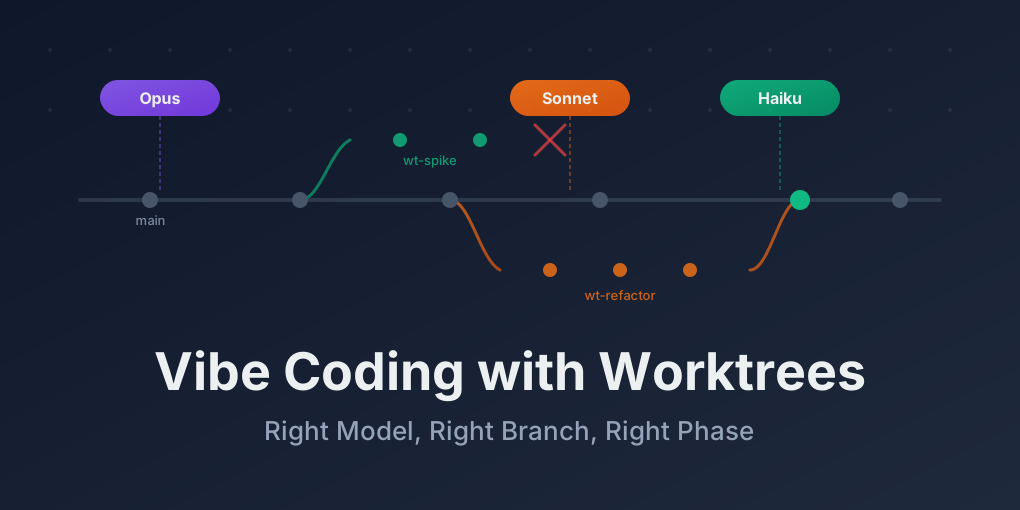
Vibe Coding with Git Worktrees: A Playbook Most Devs Are Missing
Content
- Why this playbook exists
- Claude Code common workflow (official guidance)
- Git branch vs. Git worktree (why it still matters)
- Claude Code sessions and worktrees (clarification)
- Model selection by phase
- Worktree strategies by risk
- Decision cheat sheet
- A workflow you can copy-paste
- Do/Don’t rules
- TL;DR
Why this playbook exists
Vibe coding works great for greenfield work, but refactors fail when the workflow is fuzzy: you’re changing too much at once, the model is doing the wrong kind of work, and everything lives in a single long-running branch.
This guide restructures the refactor workflow around Claude Code’s official “common workflows” guidance and pairs it with a practical Git worktree strategy. The goal is simple: keep changes small, keep context stable, and keep a fast path to compare behavior.
Claude Code common workflow (official guidance)
The Claude Code docs emphasize a consistent pattern when working in real codebases:
- Start with context — scan the codebase and ask Claude for a short plan before touching anything.
- Make changes incrementally — update small slices of the code, keep the diff readable, and avoid massive one-shot rewrites.
- Verify and iterate — run checks, inspect changes, and loop with Claude to fix regressions.
This playbook builds on that pattern: context → plan → incremental edits → verification. Git worktrees make that loop faster because you can keep “before” and “after” states open at the same time.
Git branch vs. Git worktree (why it still matters)
Worktrees are often misunderstood as “just another branch.” They’re not. They solve a different problem: multiple working directories for multiple branches at the same time.
How branches work
A branch is a pointer to a commit. When you git switch feature-x, Git rewrites your working directory in place.
my-project/          ← one folder, one branch at a time
  ├── src/
  ├── package.json
  └── .git/          ← all branches live here as refs
The limitation is obvious: one branch per folder. If you need to compare against main, you must stash/switch/stash back — slow and context-breaking.
How worktrees work
A worktree creates another working directory that shares the same .git data but checks out a different branch.
my-project/              ← main branch (original)
  ├── src/
  ├── package.json
  └── .git/              ← the single source of truth

../my-spike/             ← spike branch (worktree)
  ├── src/
  ├── package.json
  └── .git  (file)       ← pointer back to my-project/.git

../my-refactor/          ← refactor branch (worktree)
  ├── src/
  ├── package.json
  └── .git  (file)       ← same pointer
Key facts:
- All worktrees share the same Git history and objects (no duplicate
.gitblobs) - Each worktree has its own working directory and index, so changes don’t collide
- You cannot check out the same branch in two worktrees simultaneously
- Commits made in any worktree are visible in the others immediately
When to use which
| Scenario | Use branch | Use worktree |
|---|---|---|
| Quick feature, no context switching needed | Yes | Overkill |
Need to reference main while refactoring | Stash-switch is painful | Yes — keep both open |
| Running an AI agent on a long task | Risky to switch mid-session | Yes — separate folder, separate session |
| Throwaway experiment / spike | Sure, but cleanup is manual | Yes — git worktree remove and it’s gone |
| Comparing old vs. new behavior side by side | Awkward with one folder | Yes — two VS Code windows |
| CI broke main, need a hotfix while deep in a refactor | Stash everything, fix, pop | Yes — hotfix in wt-main, don’t touch refactor |
| Multiple team members, each on a module | Branches are fine | Worktrees if they need cross-reference |
The rule of thumb: if you’re going to switch branches more than twice in an hour, or if you need two versions of the code visible at the same time, use a worktree. If it’s a simple feature branch you’ll merge and delete, a regular branch is fine.
Git worktree vs. Claude Code worktree (clarification)
This is where people get tripped up: git worktree is a core git feature. Claude Code “worktree” isn’t a separate mechanism — it’s just a Claude Code session pointed at a folder that happens to be a git worktree. In other words:
- Git creates and manages worktrees (
git worktree add/list/remove) - Claude Code (or any editor/agent) simply opens a specific worktree directory
- If a tool says it “creates worktrees,” it’s just automating the git commands for you
So the clean mental model is: Git worktrees are the filesystem layout; Claude Code worktrees are the AI sessions you attach to each layout. Keep those separate and the workflow makes sense.
The AI coding angle
Here’s why this matters specifically for vibe coding: when you have Claude Code or Cursor working in a session, switching branches kills the context. The AI was building up understanding of the files in your working directory. If you stash and switch to main to check something, then switch back, the AI’s mental model might not survive the disruption.
With worktrees, you never switch. Main is always over there. Your refactor is always right here. Your spike is in a third folder. Each can have its own terminal, its own AI session, its own flow state. That’s the real reason worktrees pair so well with AI-assisted development.
The four phases of vibe coding (and which model to use)
Here’s where it gets interesting. Most people just pick one model and go. But each phase of a refactor has different needs:
Phase 1: Understanding — “What even is this code doing?”
Rule of thumb: if you need two versions of the code visible at once, use a worktree.
Claude Code sessions and worktrees (clarification)
Claude Code doesn’t invent a new worktree concept. Git creates worktrees; Claude Code sessions attach to a folder.
- Git manages worktrees (
git worktree add/list/remove) - Claude Code (or any editor/agent) simply opens a worktree directory
- If a tool “creates worktrees,” it’s just automating Git commands
The clean mental model: Git worktrees are the filesystem layout; Claude Code sessions are the AI context for each layout.
Model selection by phase
Claude’s workflow guidance maps cleanly to model usage. Use the right model for the job:
Phase 1: Understand
Use a strong model. Map the architecture, dependencies, invariants, and risk areas.
Phase 2: Plan
Use a strong model again. Produce a short design note and a migration checklist.
Phase 3: Execute
Use a fast model. Apply mechanical edits, codemods, and wiring changes.
Phase 4: Verify
Return to a strong model. Diagnose regressions and review for behavior parity.
Worktree strategies by risk
Strategy A: One branch (low risk)
Use a single branch when tests stay green after every step.
Strategy B: Two worktrees (medium risk)
wt-main     → clean baseline
wt-refactor → long-running refactor branch
Use this when you expect broken builds or frequent comparisons.
Strategy C: Three worktrees (high uncertainty)
wt-main  → baseline
wt-spike → throwaway experiment
wt-impl  → clean implementation
Use this when you’re not sure the approach works. Spikes are cheap — delete them without regret.
Strategy D: Multi-track (team or multi-module)
wt-auth-refactor
wt-storage-refactor
wt-ui-refactor
→ merge into integration branch when each is stable
Decision cheat sheet
| Situation | Model | Worktree strategy |
|---|---|---|
| “I don’t understand this code yet” | Strong | Read-only on main |
| “I have a plan, lots of files to change” | Fast | wt-refactor |
| “Not sure if this approach works” | Strong for spike, fast for impl | wt-spike + wt-impl |
| “Build will be broken for days” | Mixed | Keep clean wt-main |
| “Flaky regressions after changes” | Strong | Keep changes small |
| “Massive renames and file moves” | Fast for moves, strong for edges | wt-refactor |
A workflow you can copy-paste
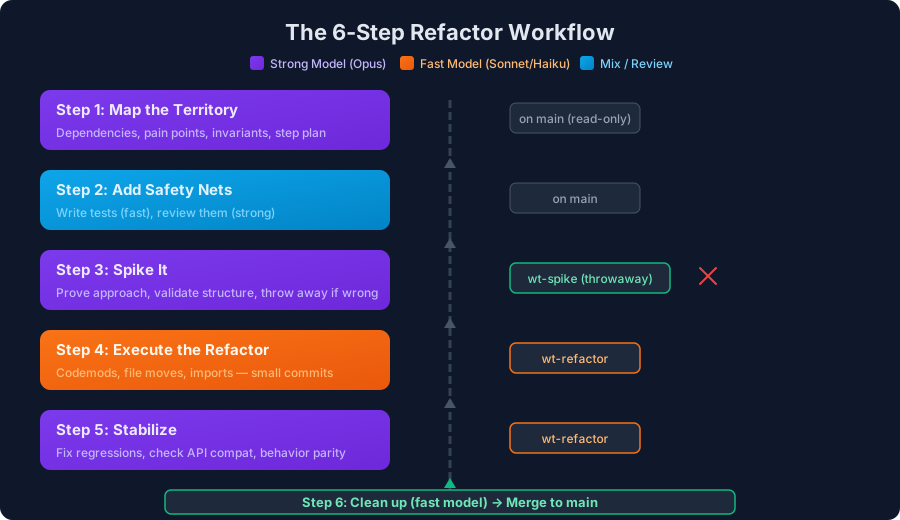
Step 1: Map the territory (strong model, main)
- Document modules, dependencies, pain points
- Define the refactor target and step plan
- Identify invariants and tests to add first
Step 2: Add safety nets (fast model writes, strong model reviews)
- Strengthen tests before touching core logic
- Add feature flags or adapters if needed
Step 3: Spike it (strong model, wt-spike)
- Prove the new approach compiles and integrates
- Delete the worktree if the spike fails
Step 4: Execute the refactor (fast model, wt-refactor)
- Apply codemods and file moves
- Commit in small, logical chunks
Step 5: Stabilize (strong model, still on wt-refactor)
- Fix regressions and edge cases
- Review for API compatibility
Step 6: Clean up and merge (fast model)
- Remove dead code and temporary adapters
- Merge into
main, delete worktrees
Do/Don’t rules
Do:
- Keep a worktree on
mainto reproduce bugs fast - Isolate experiments in a spike worktree
- Keep change sets small and cohesive
- Use strong models for thinking, fast models for mechanical edits
Don’t:
- Run multiple high-churn refactor branches without an integration plan
- Use your most expensive model for repetitive changes
- Skip the understanding phase
- Let a spike branch quietly become your production branch
TL;DR
Claude’s official workflow guidance boils down to context → plan → incremental changes → verification. Pair that loop with Git worktrees, and you’ll refactor faster with fewer surprises.