Stop Reinventing the Agent — wtcraft Boundaries, Ledgers & Sign-off First / 别卷 Agent 了:wtcraft 要先把边界、账本和验收做好


English version first. 中文版在后。
English Version
Prologue: Starting from a source leak
Around 2026-03-31, Claude Code had an npm source-map leak. InfoQ reported that @anthropic-ai/claude-code 2.1.88 shipped a source map it shouldn’t have; Axios reported Anthropic’s statement that no customer data or credentials were exposed.
For someone building a multi-agent harness, the interesting part isn’t the gossip — it’s that the wider community could, for the first time, see the engineering shape of a mature coding agent. Not how magical the prompt is, but how the ring of permissions, compaction, tools, and sessions around the loop is wired. Later, analyses based on publicly available TypeScript appeared on arXiv, e.g. Dive into Claude Code, which boils the core down to a plain sentence: model -> tools -> repeat.
I will not quote, redistribute, or reproduce any concrete implementation from the leaked code. What actually got me writing again was a reverse-engineering reference site I recently noticed: the CCB (Claude Code Best) architecture docs at https://ccb.agent-aura.top/docs/introduction/what-is-claude-code. It comes with a community reconstruction, claude-code-best/claude-code — a runnable, debuggable Claude Code rebuild in TypeScript + Bun (declared for learning/research only; all rights belong to Anthropic).
The value of the CCB docs is that they break Claude Code into a clean six-layer architecture. So I did something I’d wanted to do for a while: use CCB’s six layers as a common ruler and line up openai/codex against the Claude Code camp (official anthropics/claude-code + the rebuild claude-code-best/claude-code).
This is Part 4 of the TokenChef series. The conclusion up front:
After the comparison, I’m more certain than ever about
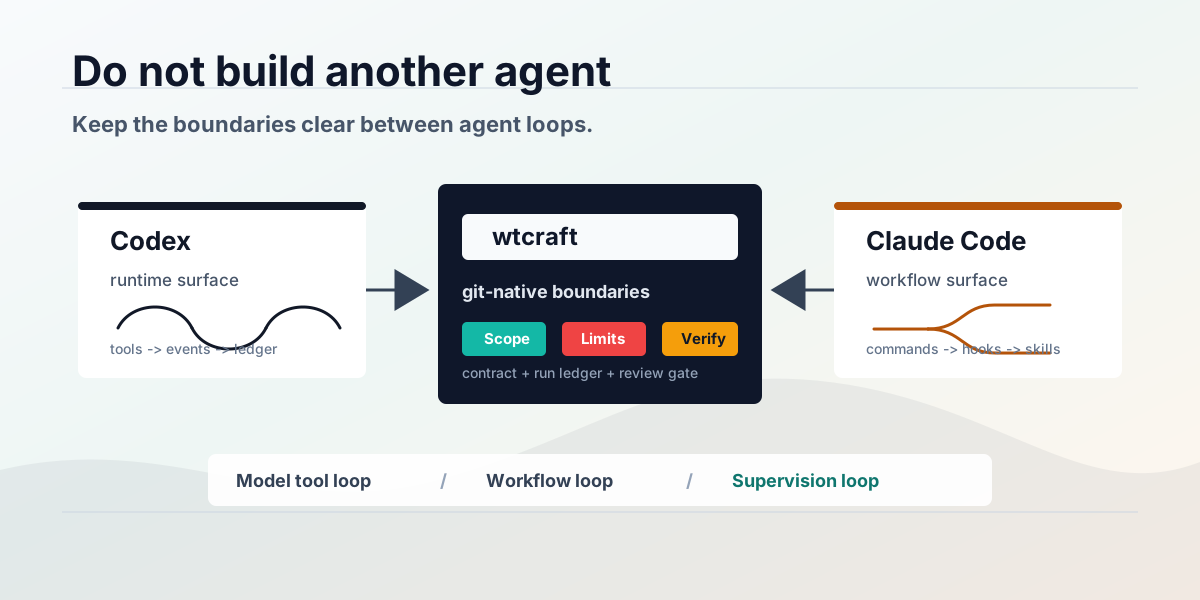
wtcraft’s role — it shouldn’t become Codex, nor Claude Code. It should nail the boundaries, ledger, and verification around these coding agents.
Projects studied
- wtcraft: https://github.com/zywkloo/wtcraft
- OpenAI Codex: https://github.com/openai/codex
- Anthropic Claude Code (official): https://github.com/anthropics/claude-code
- claude-code-best/claude-code (community rebuild): https://github.com/claude-code-best/claude-code
- CCB architecture docs (reverse-engineered): https://ccb.agent-aura.top/docs/introduction/what-is-claude-code
- Claude Code Agent SDK docs: https://code.claude.com/docs/en/agent-sdk/agent-loop
1. Setting the ruler: CCB’s six-layer architecture
The CCB docs describe Claude Code as a terminal-native agentic coding system, split into six layers (with file names from the rebuild):
| Layer | Representative component | Responsibility |
|---|---|---|
| Entry | cli.tsx → main.tsx | Init Commander.js CLI, inject runtime polyfills, set build targets |
| Interaction | REPL.tsx | React / Ink terminal UI; capture input, keep session state |
| Orchestration | QueryEngine.ts | Manage turn lifecycle, token budget, context-compaction triggers |
| Core Loop | query.ts | Assemble context → call API → parse tool calls → permission check → execute tools → iterate |
| Tool | BashTool / FileEditTool / Grep … | File ops, command execution, code search |
| Communication | claude.ts | HTTP streaming to the Anthropic API, multi-provider (Bedrock / Vertex / Foundry) |
The benefit: it pins the over-used term “agent loop” onto a comparable skeleton. The core loop (query.ts) is actually short; all the complexity lives one layer above (budget + compaction) and one below (the permission gate in the tool layer).
Let me drop Codex into the same six layers.
2. Codex against the six layers
openai/codex is a Rust implementation that’s runtime-first, protocol-driven, observable. Mapped layer by layer, it’s strikingly aligned with CCB’s skeleton:
| CCB layer | Codex counterpart |
|---|---|
| Entry | codex CLI (Rust, multi-subcommand) |
| Interaction | ratatui-based TUI; plus the codex exec headless entry |
| Orchestration | session / thread / turn state machine, token budget, compaction |
| Core Loop | core agent loop: the state machine between a model turn and tool calls |
| Tool | sandboxed command execution, apply_patch, MCP tools |
| Communication | model client, streaming, responses protocol |
The differences are mostly in the outer two layers:
- Entry/Interaction: Codex makes headless a first-class citizen.
codex exec --jsonemits a JSONL event stream by default, and sessions can roll out to JSONL. That makes Codex naturally feel like “a coding worker other systems can call.” - Boundary layer: Codex makes sandbox / approval very explicit — Seatbelt on macOS, Landlock/seccomp on Linux, plus
--sandboxand approval policy.
The core loop itself? Same big shape as CCB’s query.ts: assemble context → call model → execute approved tools → feed results back → continue or stop.
For wtcraft, Codex’s single most valuable bit is:
codex exec --json \
  --sandbox workspace-write \
  --output-last-message last.md \
  "Read .worktree-task.md and implement only the Scope."
This turns “I trust the agent that says it’s done” into “I have a parseable, auditable execution ledger” — when it started, which shell commands ran, which files changed, how many tokens, the final message, whether it failed, and where.
3. The Claude Code camp against the six layers
The Claude Code side splits in two, because the official repo and the rebuild expose different things.
Official anthropics/claude-code looks more like a product + plugin-ecosystem entry point: install entry, plugin catalog, commands, agents, hooks, bug report, privacy notes. It doesn’t lay out a full runtime like Codex does. But per the Agent SDK docs, the SDK runs the same autonomous agent loop as Claude Code — assess state, call tools, receive results, repeat until done — exposing Read/Edit/Write/Glob/Grep/Bash/Web/Agent/Skill/hooks/permissions/budget/usage/session/compaction.
The rebuild claude-code-best/claude-code + CCB docs fill in what the official repo doesn’t expose. The rebuild is a TypeScript (99.8%) + Bun monorepo, 450+ chunks after build, extended with multi-instance orchestration (Pipe IPC / LAN discovery), ACP (Zed / Cursor integration), self-hosted remote control, enterprise monitoring (Langfuse / Sentry), and custom model providers (OpenAI / Gemini / Grok).
Mapped back onto CCB’s six layers, it’s nearly one-to-one (the CCB docs are written against the rebuild’s file structure after all):
| CCB layer | Claude Code camp counterpart |
|---|---|
| Entry | official claude CLI; rebuild cli.tsx → main.tsx |
| Interaction | terminal / IDE / GitHub entries; rebuild REPL.tsx (React/Ink) |
| Orchestration | QueryEngine.ts: turn lifecycle, budget, compaction |
| Core Loop | query.ts: the agentic loop |
| Tool | BashTool / FileEditTool / Grep + permission checks |
| Communication | claude.ts: streaming + multi-provider adapters |
Claude Code’s differentiation is in its outer workflow surface: CLAUDE.md, slash commands, hooks, skills, subagents, plugins, MCP, IDE / GitHub / terminal entries, permission prompts, project memory. Its strength isn’t “no runtime”; it’s wrapping the runtime into the developer’s daily workflow.
It has headless too (claude -p / print mode), but the output shape differs from Codex — a pitfall I cover in §5.
4. Verdict: the cores are nearly identical; the differences are surface and packaging
After lining up all three (Codex / official CC / rebuild CC) against one six-layer skeleton, the immediate impression is:
Entry / Interaction ── once the biggest difference, now converging (both grew CLI + desktop GUI + IDE + web/cloud)
Orchestration       ── highly similar (turn lifecycle + token budget + context compaction)
Core Loop           ── nearly identical (assemble context → call model → execute tools → feed back → continue/stop)
Tool                ── same shape (files / search / shell / MCP + permission gate)
Communication       ── same (streaming + multi-provider)
I need to correct a lazy claim I made earlier: “the entry/interaction layer differs most” is already out of date. After several revisions, the two product surfaces look more and more alike:
- Claude Code is no longer just a terminal tool. The desktop app now has three tabs — Chat (quick conversations), Cowork (an autonomous agent with 50+ connectors that handles everything except code), and Code (the terminal-native developer tool) — plus a VS Code extension and a web IDE.
- Codex is no longer just a CLI either. It has an app, IDE integrations, and the CLI still runs in the terminal — almost a mirror image of Claude Code.
So the “Codex = headless-first, Claude Code = workflow-first” dichotomy doesn’t really hold by mid-2026. Both now cover all four surfaces: CLI / GUI / IDE / cloud. A more accurate statement:
The closer you look at the core loop, the more Codex and Claude Code resemble each other; the outer layers (entry, interaction) once differed most, but are now converging fast too. The overall trend is simply: more and more alike.
As a table:
| Dimension | Codex | Claude Code (official + rebuild) |
|---|---|---|
| Core loop | model–tool loop | model–tool loop |
| Orchestration | session/thread/turn, budget, compaction | QueryEngine: turn, budget, compaction |
| Entry points | CLI + app + IDE (headless / JSONL still most prominent) | CLI + desktop Chat/Cowork/Code + VS Code + web IDE |
| Project memory | agent instructions / sessions / run events | CLAUDE.md, skills, hooks, commands, plugins, sessions |
| Boundary control | OS-kernel-level sandbox / approval / event lifecycle | app-layer permissions / hooks / approval / budgets / compaction |
| Lesson for wtcraft | auditable execution ledger | sustainable project workflow |
This isn’t about who’s ahead. They expose increasingly similar product surfaces on top of the same class of agent architecture.
Aside: CC CLI vs Codex CLI (there’s systematic comparison material)
Since both treat the CLI as a core entry point, let’s put the two CLIs side by side. There’s plenty of systematic comparison online (NxCode, Termdock, DataCamp, Northflank); the synthesis is roughly:
| Dimension | Claude Code CLI | Codex CLI |
|---|---|---|
| Open source | closed | open (Rust) |
| Sandbox | app-layer hooks / permissions | OS-kernel-level (macOS Seatbelt / Linux Landlock) |
| Default execution | local | leans cloud / isolated sandbox |
| Token efficiency | burns fast | ~4× leaner on equivalent tasks |
| Speed / throughput | slower, reasoning-heavy | faster, leads Terminal-Bench 2.0 (~77.3%) |
| Code quality | ~80.9% SWE-bench Verified, ~67% blind win rate | slightly lower, gap narrowing |
| Context | 1M (production-ready) | 1M (GPT-5.4, experimental) |
| Extensions | MCP / hooks / plan mode / subagents / skills / /loop | MCP / codex exec headless / JSONL event stream |
| Entry price | from $20/mo | from $20/mo |
Don’t read only the scores:
- Reasoning-heavy vs throughput-heavy: when a change touches a dozen files and the dependency graph matters, Claude Code’s “build a mental map first, then write” is steadier; when you need fast, isolated, CI-friendly execution on a budget, Codex CLI fits better.
- Different boundary philosophies: Codex pushes isolation down to the OS kernel; Claude Code relies mostly on app-layer hooks / permissions. That echoes this post’s theme — this is exactly the boundary layer
wtcraftwants to fill from further out, with git worktrees.
But note: these are differences in outer surface + model capability. Drop them back into the six-layer architecture from §1–3 and the core is still the same model–tool loop. So the conclusion holds: the surface diverges in competition, while the core keeps converging.
5. What the leak + reverse engineering really show: the loop isn’t mysterious; the surrounding system is hard
From CCB’s breakdown and public analysis, the core loop really isn’t mysterious:
while task not done:
  call model
  execute approved tools
  feed results back
The real engineering weight is all around it:
- Permissions: which tools auto-run, which must ask a human, which are forbidden.
- Context management: how a long task compacts history, keeps key decisions, avoids context blow-up (QueryEngine’s compaction triggers).
- Tool ecosystem: built-in files / search / shell / Web / MCP / custom tools.
- Workflow affordances:
CLAUDE.md, commands, skills, hooks, plugins. - Delegation: subagents, isolated workspaces, parent/child task summaries.
- Observability: session, usage, cost, result subtype, hook events.
This directly settles wtcraft’s role. Since both Codex and Claude Code already have a mature model–tool loop, writing yet another loop in wtcraft is low value, high risk. What’s actually missing is a handoff system across agents, worktrees, and tasks:
Which task?
Which branch?
Which files?
Which off-limits paths?
Which verification commands?
Which run artifacts?
Which reviewer signs off?
Put plainly: land the collaboration process onto files, branches, logs, and verification results.
6. Agent loop: don’t copy the brain, control the loop boundary
After the study, there’s a temptation: shouldn’t we implement our own agent loop in wtcraft too?
My answer: no — at least not now.
Codex already does a ton of complex engineering on the inner loop — streaming, tool router, parallel tool calls, sandboxed execution, approval, diff tracking, context compaction, token-limit handling, pending-input drain, turn lifecycle, hooks. The Claude Code camp likewise has full tool calling, permissions, hooks, commands, subagents, skills, plugins, MCP, compaction, sessions, and budgets.
If wtcraft rewrote that loop, it would turn from a light harness into a runtime competitor — not its strength. What it should control is the outer loop:
Plan
→ Create worktree
→ Write task contract
→ Invoke agent
→ Capture run ledger
→ Check scope
→ Verify commands
→ Review / replan / finish
Keep the two layers distinct:
| Layer | Owner | Concern |
|---|---|---|
| Model tool loop | Codex / Claude Code | How to read context, call tools, change code |
| Supervision loop | wtcraft | Who does which task, which files are editable, did it pass verification, how to hand off |
So the principle I increasingly believe:
wtcraftshouldn’t chase agentic autonomy; it should chase bounded automation. Automation can be powerful, but the boundary must be narrow.
7. Headless: don’t conflate the two output formats
If I pick one lesson from Codex, it’s headless + JSONL. Commands like codex exec are born to be called by shells / CI / orchestrators.
But here’s the pitfall: Claude Code also has headless (claude -p / print mode), and its output shape differs from Codex.
# Codex: JSONL event stream by default
codex exec --json ...

# Claude Code: a single JSON result object; text in .result, with session id / usage / cost
claude -p "Summarize this project" --output-format json

# Claude Code: for line-by-line events you must explicitly stream
claude -p "Explain recursion" --output-format stream-json --verbose --include-partial-messages
Summary:
| Engine | Headless command | Programmatic shape |
|---|---|---|
| Codex | codex exec --json ... | JSONL event stream by default |
| Claude Code | claude -p --output-format json ... | single JSON result object |
| Claude Code | claude -p --output-format stream-json --verbose ... | JSONL event stream |
An even nastier detail: cost ≠ billing. Claude Code’s --output-format json payload includes total_cost_usd and a per-model breakdown; the Agent SDK result message also carries usage / total_cost_usd / num_turns / session_id. But total_cost_usd is a client-side estimate computed from a local price table. For Pro / Max subscribers, session cost ≠ real billing — the official costs page reminds subscribers to watch the plan usage bars rather than treat that dollar figure as billing truth.
So wtcraft’s run ledger can record token usage, session id, num turns, model breakdown, estimated cost — but it shouldn’t settle finances with total_cost_usd.
This is the most concrete problem of building a multi-agent orchestrator under subscriptions: command formats, permission modes, output schemas, usage metadata, plan limits — none of it is standardized, and these CLIs iterate fast. A field you can parse today may be renamed, moved, split into events, or only appear under a certain auth/plan/flag combo tomorrow.
Below the surface there are also task and sandbox boundaries:
- Task boundary: which issue / branch / files / acceptance criteria this agent owns.
- Sandbox boundary: can it write files, where, run a shell, reach the network, read local secrets.
- Escalation boundary: which commands auto-pass, which stop to ask, which are forbidden.
- Merge boundary: when a worktree’s result enters the mainline, when it must be sent back.
So a fully automatic orchestrator’s ROI takes a haircut. wtcraft’s saner path: land run results as its own run artifacts while allowing human takeover; keep the engine adapter thin and conservative so a break just loses some metadata rather than stalling the whole task system.
.wtcraft/runs/<run-id>/
  events.jsonl
  last-message.md
  usage.json
  changed-files.txt
  verification.json
  summary.md
Because multi-agent’s biggest problem was never “the agent isn’t smart enough.” It’s: what did it actually do? did it overstep? which files changed? did it run verification? where did it fail? can the next agent pick up?
Without a run ledger, multi-agent degrades into a pile of chat windows. With a run ledger, multi-agent can become an engineering system.
8. Worktree isolation: not a moat, but wtcraft’s job to get right
Let’s be clear up front: git worktree is a built-in git feature anyone can use — it’s nobody’s moat. Codex, Claude Code, even a shell script can spin up worktrees. wtcraft doesn’t gain a barrier just by “using worktrees.”
But it is the thing wtcraft should own. Codex and Claude Code can both work inside a repo, yet neither is a “cross-task worktree orchestrator” by default — they care about doing one coding turn well, not about isolating, logging, verifying, and merging many tasks across many worktrees. Nobody does that part for you, and it happens to be the real pain point of multi-agent collaboration.
So wtcraft’s core assumption is plain:
An agent’s isolation boundary shouldn’t rely only on prompts; it should land on a git worktree.
The value isn’t “inventing worktrees” — it’s upgrading a worktree into a cross-agent task contract: each worktree carries a .worktree-task.md, a run ledger, and a check / verify pair, so any agent (or human) can take the baton under the same boundary.
“please only edit these files” in a prompt helps, but isn’t enough. The sturdy boundary looks like:
Task A → worktree A → Scope A → verify A
Task B → worktree B → Scope B → verify B
Task C → worktree C → Scope C → verify C
Direct benefits:
- Context isolation: each agent sees only its own task contract.
- Visible conflicts: shared files serialize; file-disjoint tasks parallelize.
- Cheap rollback: a broken worktree doesn’t pollute the main workspace.
- Clear handoff: the next agent reads the task file, diff, and run ledger — not the whole chat history.
- Automatable verification:
wtcraft check/wtcraft verifyrun independently of the agent.
This is the biggest difference between wtcraft and a typical agent CLI:
An agent CLI cares about “how to complete one coding turn.”
wtcraftcares about “how to organize many coding turns into a mergeable engineering workflow.”
9. wtcraft’s next steps: boundaries, ledger, verification
After studying these projects, I think wtcraft should stay deliberately light. Not “another Codex / another Claude Code / another all-in-one runtime,” but:
a git-native, agent-neutral, budget-aware coordination harnessPriorities:
Priority 1: Task / Sandbox boundary
Make “who can do what” explicit. .worktree-task.md isn’t just a task description — it should gradually carry the boundary declaration:
scope:
  - src/auth/**
off_limits:
  - package.json
  - .env*
sandbox:
  filesystem: workspace-write
  network: false
allowed_commands:
  - npm test
  - npm run lint
requires_approval:
  - git commit
  - npm install
The point isn’t a perfect sandbox right away; it’s writing the boundary into a repo-native contract so humans, Codex, Claude Code, Gemini, and CI all see the same constraints. Without a task boundary, agents do too much; without a sandbox boundary, agents act in the wrong place; without an approval boundary, automation turns from “saving time” into “manufacturing risk.”
Priority 2: Run ledger
Every run should leave a structured trail:
.wtcraft/runs/<run-id>/
  meta.json
  prompt.md
  events.jsonl
  last-message.md
  changed-files.txt
  check.txt
  verify.txt
  summary.md
This turns agent work from “chat logs” into “engineering records.”
Priority 3: Thin engine adapter
Don’t bind wtcraft to one CLI, and don’t make “fully automatic orchestration of all agents” the short-term headline. Start with a thin adapter:
wtcraft run <worktree> --engine codex
wtcraft run <worktree> --engine claude   # expand gradually
wtcraft run <worktree> --engine gemini
The adapter only handles: how to launch the agent, how to pass the prompt, how to collect output (Codex’s --json and Claude’s --output-format json / stream-json are not the same shape), how to land run artifacts, and how to leave enough info on failure for a human to take over. Real boundaries still come from .worktree-task.md / check / verify — when metadata can’t be captured, the task shouldn’t fail; at most this run’s ledger is incomplete.
Priority 4: Contract schema
.worktree-task.md stays human-readable while becoming gradually machine-readable:
status: ready
agent: codex
priority: medium
scope:
  - src/auth/**
off_limits:
  - package.json
verification:
  - npm test
This makes handoffs between Planner, Executor, Verifier, and Finisher sturdier.
Priority 5: Verifier as a first-class role
The biggest risk today isn’t that agents can’t write code — it’s that they’ll confidently say “done.” So the Verifier can’t be a manual afterthought:
wtcraft check <worktree>
wtcraft verify <worktree>
wtcraft review <worktree>   # later: Codex review / Claude review, even cross-review
But whoever reviews, it all comes back to: diff, Scope, Off-limits, tests, exit code.
10. Design principle: make agents contractors, not roommates
Don’t let an agent move into your main workspace like a roommate; let it work like a contractor — on a defined site, under a clear contract, against clear acceptance criteria.
- Codex makes a great observable contractor.
- Claude Code makes a great pair partner that knows your project’s habits.
wtcraftshould be the project manager: split tasks, open worktrees, write the contract, check overreach, run acceptance, keep the ledger, merge results.
This is the direction TokenChef has chased all along:
Not buying the single most expensive super-agent, but organizing cheap, differently-skilled, replaceable agents into a controllable small team.
After lining Codex and Claude Code up against one six-layer architecture, the lesson for wtcraft is simple:
Codex teaches observability.
Claude Code teaches workflow.
wtcraft should provide boundaries.
Agents will keep getting stronger. But the stronger the agent, the more it needs clear boundaries. That’s exactly what wtcraft is for.
中文版
引子:从一次源码泄露说起
2026-03-31 前后,Claude Code 出了一次 npm source map 泄露事件。InfoQ 的报道 说,@anthropic-ai/claude-code 2.1.88 里夹带了本不该发布的 source map;Axios 的报道 引述 Anthropic 的说法,称没有客户数据或凭据暴露。
对我这种做 multi-agent harness 的人来说,这件事的意义不在「八卦」,而在于:它让外界第一次能比较系统地看到一个成熟 coding agent 的工程形状——不是它的 prompt 有多神,而是 loop 周围那一圈权限、压缩、工具、会话是怎么搭的。后来 arXiv 上也有基于公开可得 TypeScript 源码写的分析,比如 Dive into Claude Code,把核心概括成一句很朴素的话:model -> tools -> repeat。
我不会在这里引用、传播或复刻泄露代码里的任何具体实现。真正让我重新动笔的,是最近注意到的一个逆向工程资料站:CCB(Claude Code Best) 的架构文档 https://ccb.agent-aura.top/docs/introduction/what-is-claude-code。它配套一个社区重建项目 claude-code-best/claude-code——一个用 TypeScript + Bun 写的、可运行可调试的 Claude Code 重构版(声明仅供学习研究,版权归 Anthropic)。
CCB 文档的好处是:它把 Claude Code 拆成了清清楚楚的六层架构。于是我做了一件一直想做的事——用 CCB 的这套六层架构当统一标尺,把 openai/codex 和 Claude Code 阵营(官方 anthropics/claude-code + 重建版 claude-code-best/claude-code)摆在一起对比。
这篇是 TokenChef 系列第四篇。结论先放这儿:
对比完之后,我对
wtcraft的定位反而更确定了—— 它不该变成 Codex,也不该变成 Claude Code,而该把这些 coding agent 的边界、账本、验收做扎实。
这次研究的几个项目
- wtcraft:https://github.com/zywkloo/wtcraft
- OpenAI Codex:https://github.com/openai/codex
- Anthropic Claude Code(官方):https://github.com/anthropics/claude-code
- claude-code-best/claude-code(社区重建版):https://github.com/claude-code-best/claude-code
- CCB 架构文档(逆向解读):https://ccb.agent-aura.top/docs/introduction/what-is-claude-code
- Claude Code Agent SDK 文档:https://code.claude.com/docs/en/agent-sdk/agent-loop
1. 先定标尺:CCB 给出的六层架构
CCB 文档把 Claude Code 描述成一个 terminal-native 的 agentic coding system,并拆成六层(对应重建版里的文件名):
| 层级 | 代表组件 | 职责 |
|---|---|---|
| Entry 入口层 | cli.tsx → main.tsx | 初始化 Commander.js CLI、注入运行时 polyfill、设定构建目标 |
| Interaction 交互层 | REPL.tsx | React / Ink 终端 UI,捕获输入、维护 session 状态 |
| Orchestration 编排层 | QueryEngine.ts | 管理 turn 生命周期、token 预算、上下文压缩触发 |
| Core Loop 核心循环层 | query.ts | 组装上下文 → 调 API → 解析工具调用 → 权限检查 → 执行工具 → 迭代 |
| Tool 工具执行层 | BashTool / FileEditTool / Grep … | 文件操作、命令执行、代码搜索 |
| Communication 通信层 | claude.ts | 对 Anthropic API 的 HTTP streaming,多 provider(Bedrock / Vertex / Foundry) |
这套分层的好处是:它把「agent loop」这个被说烂的词,落到了一个可对照的骨架上。核心循环(query.ts)其实很短,复杂度全在它上下两层——编排层的预算与压缩、工具层的权限门。
下面我就用这六层,把 Codex 也摆进去。
2. 把 Codex 摆进这六层
openai/codex 是 Rust 实现,强调 runtime-first、协议化、可观测。逐层对应一下,会发现它和 CCB 那套骨架惊人地一致:
| CCB 层级 | Codex 对应物 |
|---|---|
| Entry 入口层 | codex CLI(Rust,多子命令) |
| Interaction 交互层 | ratatui 写的 TUI;外加 codex exec headless 入口 |
| Orchestration 编排层 | session / thread / turn 状态机、token 预算、压缩 |
| Core Loop 核心循环层 | core agent loop:model turn ↔ tool call 之间的状态机 |
| Tool 工具执行层 | sandbox 命令执行、apply_patch、MCP 工具 |
| Communication 通信层 | model client、streaming、responses 协议 |
差异主要在最外两层:
- 入口/交互层:Codex 把 headless 做成一等公民。
codex exec --json默认吐 JSONL event stream,session 还能 rollout 成 JSONL。这让 Codex 天然像「一个可以被别的系统调用的 coding worker」。 - 边界层:Codex 把 sandbox / approval 做得很显式——macOS 上 Seatbelt、Linux 上 Landlock/seccomp,配
--sandbox与 approval policy。
核心循环本身呢?跟 CCB 描述的 query.ts 是同一个大结构:组装上下文 → 调模型 → 执行被允许的工具 → 把结果喂回去 → 继续或停止。
对 wtcraft 来说,Codex 最有价值的那一点是:
codex exec --json \
  --sandbox workspace-write \
  --output-last-message last.md \
  "Read .worktree-task.md and implement only the Scope."
这条命令把「我相信 agent 说它做完了」变成「我有一份可解析、可审计的执行账本」——什么时候开始、跑了哪些 shell、改了哪些文件、token 用了多少、最后说了什么、有没有失败、失败在哪。
3. 把 Claude Code 阵营摆进这六层
Claude Code 这边要分两半看,因为官方仓库和重建版暴露的东西不一样。
官方 anthropics/claude-code 公开出来的,更像一个产品 + 插件生态入口:安装入口、插件目录、commands、agents、hooks、bug report、隐私说明。它不像 Codex 那样把完整 runtime 摊开给你读。但从 Agent SDK 文档 看,SDK 跑的就是和 Claude Code 同源的 autonomous agent loop——评估状态、调工具、收结果、重复,直到任务结束,并暴露 Read/Edit/Write/Glob/Grep/Bash/Web/Agent/Skill/hooks/permissions/budget/usage/session/compaction 等能力。
重建版 claude-code-best/claude-code + CCB 文档 则补上了官方没摊开的那部分。重建版是 TypeScript(99.8%)+ Bun 的 monorepo,构建后 450+ chunk,还往外扩了多实例编排(Pipe IPC / 局域网发现)、ACP(Zed / Cursor 集成)、自托管远程控制、企业监控(Langfuse / Sentry)、自定义 model provider(OpenAI / Gemini / Grok)等。
把它逐层对应回 CCB 的六层,几乎是一比一(毕竟 CCB 文档就是按重建版的文件结构写的):
| CCB 层级 | Claude Code 阵营对应物 |
|---|---|
| Entry 入口层 | 官方 claude CLI;重建版 cli.tsx → main.tsx |
| Interaction 交互层 | terminal / IDE / GitHub 入口;重建版 REPL.tsx(React/Ink) |
| Orchestration 编排层 | QueryEngine.ts:turn 生命周期、budget、compaction |
| Core Loop 核心循环层 | query.ts:agentic loop |
| Tool 工具执行层 | BashTool / FileEditTool / Grep + 权限检查 |
| Communication 通信层 | claude.ts:streaming + 多 provider 适配 |
Claude Code 的差异化在外层的 workflow 表面:CLAUDE.md、slash commands、hooks、skills、subagents、plugins、MCP、IDE / GitHub / terminal 多入口、权限提示、项目记忆。它的强项不是「没有 runtime」,而是把 runtime 包进了开发者的日常工作流。
它也有 headless(claude -p / print mode),但输出形状和 Codex 不一样,这个坑后面第 5 节专门讲。
4. 对比结论:内核几乎一样,差异在表层和封装
把三者(Codex / 官方 CC / 重建版 CC)按同一套六层骨架摆完,最直接的观感是:
Entry / Interaction ── 曾经差异最大,但正在收敛(两边都长出了 CLI + 桌面 GUI + IDE + web/cloud)
Orchestration       ── 高度相似(turn 生命周期 + token 预算 + 上下文压缩)
Core Loop           ── 几乎一样(组装上下文 → 调模型 → 执行工具 → 喂回 → 继续/停止)
Tool                ── 形态一致(文件 / 搜索 / shell / MCP + 权限门)
Communication ── 一致(streaming + 多 provider)这里要修正我自己一开始的一个偷懒说法:「入口/交互层差异最大」其实已经过时了。经过几轮改版,两边的产品表面越来越像:
- Claude Code 早就不只是终端工具。桌面版现在有三个标签——Chat(快速对话)、Cowork(带 50+ connector 的自主 agent,负责 code 以外的活)、Code(terminal-native 开发工具),外加 VS Code 扩展和 web IDE。
- Codex 也不只是 CLI。它有 app、IDE 集成,CLI 也照样在终端里跑,和 Claude Code 几乎是镜像关系。
换句话说,「Codex = headless 一等,Claude Code = 工作流一等」这种二分法,在 2026 年中已经站不太住了。两边都补齐了 CLI / GUI / IDE / cloud 四种表面。所以更准确的说法是:
越往内核(Core Loop)看,Codex 和 Claude Code 越像;外层(入口、交互)曾经差得最远,但现在也在快速趋同。总体趋势就是越来越像。
汇成一张表:
| 维度 | Codex | Claude Code(官方 + 重建版) |
|---|---|---|
| 核心循环 | model–tool loop | model–tool loop |
| 编排层 | session/thread/turn、budget、compaction | QueryEngine:turn、budget、compaction |
| 外部入口 | CLI + app + IDE(headless / JSONL 仍最突出) | CLI + 桌面 Chat/Cowork/Code + VS Code + web IDE |
| 项目记忆 | agent instructions / sessions / 运行事件 | CLAUDE.md、skills、hooks、commands、plugins、sessions |
| 边界控制 | OS 内核级 sandbox / approval / event lifecycle | 应用层 permissions / hooks / approval / budgets / compaction |
| 对 wtcraft 的启发 | 可审计执行账本 | 可持续项目工作流 |
这不是谁先进谁落后的问题。它们是在同一类 agent architecture 上,给开发者暴露了越来越接近的产品表面。
插一段:CC CLI vs Codex CLI(有系统对比资料)
既然两边都把 CLI 当核心入口,那不妨直接把两个 CLI 摆一起。网上其实有不少系统对比(NxCode、Termdock、DataCamp、Northflank),综合下来大致是这样:
| 维度 | Claude Code CLI | Codex CLI |
|---|---|---|
| 开源 | 闭源 | 开源(Rust) |
| sandbox | 应用层 hooks / permissions | OS 内核级(macOS Seatbelt / Linux Landlock) |
| 默认执行 | 本地 | 偏向云端/隔离沙箱执行 |
| token 效率 | 烧得快 | 同等任务约省 4×,更省 |
| 速度 / 吞吐 | 偏慢,重推理 | 更快,Terminal-Bench 2.0 领先(约 77.3%) |
| 代码质量 | SWE-bench Verified 约 80.9%,盲测约 67% 胜率 | 略低,但差距在缩小 |
| context | 1M(生产级) | 1M(GPT-5.4,实验性) |
| 扩展机制 | MCP / hooks / plan mode / subagents / skills / /loop | MCP / codex exec headless / JSONL event stream |
| 起价 | $20/月 起 | $20/月 起 |
读法别只看分数:
- 重推理 vs 重吞吐:改动牵涉十几个文件、依赖图很重时,Claude Code 那种「先建全局心智图再下笔」更稳;要快速、隔离、塞进 CI 又想省预算时,Codex CLI 更顺手。
- 边界哲学不同:Codex 把隔离压到 OS 内核层;Claude Code 主要靠应用层 hooks / permissions。这恰恰呼应本文主题——这正是
wtcraft想用 git worktree 在更外层补齐的那层边界。
但请注意:这些都是外层表面 + 模型能力的差异。一旦把它们按第 1~3 节那套六层架构摆回去,内核还是同一套 model–tool loop。所以结论不变:表层在分化竞争,内核在持续趋同。
5. 泄露 + 逆向真正说明了什么:loop 不神秘,周边系统才难
从 CCB 的拆解和公开分析看,核心 loop 本身真的不神秘:
while task not done:
  call model
  execute approved tools
  feed results back
真正的工程含金量全在它周围:
- 权限系统:哪些工具能自动跑、哪些必须问人、哪些必须拒绝。
- 上下文管理:长任务怎么压缩历史、保留关键决策、避免上下文爆炸(QueryEngine 的 compaction 触发)。
- 工具生态:内置文件 / 搜索 / shell / Web / MCP / 自定义工具。
- workflow affordances:
CLAUDE.md、commands、skills、hooks、plugins。 - delegation:subagent、隔离工作区、父子任务摘要。
- observability:session、usage、cost、result subtype、hook events。
这直接决定了 wtcraft 的定位。既然 Codex 和 Claude Code 都已经有成熟的 model–tool loop,那 wtcraft 再写一个 loop,价值很低、风险很高。真正缺的,是跨 agent、跨 worktree、跨任务的交接系统:
Which task?         哪个任务
Which branch?       哪个分支
Which files?        能改哪些文件
Which off-limits?   哪些路径禁止动
Which verification? 用什么验收
Which artifacts?    留下哪些运行痕迹
Which reviewer? 谁来签字说白了,是把协作流程落到文件、分支、日志、验收结果上。
6. Agent loop:不要复制大脑,要控制循环边界
研究完之后,很容易产生一个诱惑:我们是不是也该在 wtcraft 里实现自己的 agent loop?
我的答案是:不要,至少现在不要。
Codex 在内层 loop 上已经做了一大堆复杂工程——streaming、tool router、并行工具调用、sandbox 执行、approval、diff tracking、上下文压缩、token 限额、pending input drain、turn lifecycle、hooks。Claude Code 阵营同样有完整的工具调用、权限、hooks、commands、subagents、skills、plugins、MCP、compaction、session、budget。
wtcraft 要是去重写这个 loop,就会从一个轻量 harness 变成 runtime 竞争者——那不是它的强项。它该控制的是更外层的那个 loop:
Plan
→ Create worktree
→ Write task contract
→ Invoke agent
→ Capture run ledger
→ Check scope
→ Verify commands
→ Review / replan / finish
这两层必须分清:
| 层级 | 谁负责 | 关注点 |
|---|---|---|
| Model tool loop | Codex / Claude Code | 如何读上下文、调工具、改代码 |
| Supervision loop | wtcraft | 谁做哪个任务、能改哪些文件、是否通过验收、如何交接 |
所以我现在越来越信这条原则:
wtcraft不该追求 agentic autonomy,而该追求 bounded automation。 自动化可以很强,但边界必须很窄。
7. Headless:别把两家的输出格式混在一起
如果只挑 Codex 的一个启发,我选 headless + JSONL。codex exec 这类命令天生适合被 shell / CI / orchestrator 调用。
但这里有个坑:Claude Code 也有 headless(claude -p / print mode),输出形状却和 Codex 不一样。
# Codex:默认就是 JSONL event stream
codex exec --json ...

# Claude Code:单个 JSON 结果对象,文本在 .result,附带 session id / usage / cost
claude -p "Summarize this project" --output-format json

# Claude Code:要逐行 event 必须显式开 stream
claude -p "Explain recursion" --output-format stream-json --verbose --include-partial-messages
汇总:
| Engine | Headless 命令 | 程序化形状 |
|---|---|---|
| Codex | codex exec --json ... | 默认 JSONL event stream |
| Claude Code | claude -p --output-format json ... | 单个 JSON 结果对象 |
| Claude Code | claude -p --output-format stream-json --verbose ... | JSONL event stream |
还有一个更要命的细节:cost 不等于账单。Claude Code 的 --output-format json payload 里有 total_cost_usd 和 per-model 拆分;Agent SDK 的 result message 也带 usage / total_cost_usd / num_turns / session_id。但 total_cost_usd 是客户端按本地价格表算出来的估算值。对 Pro / Max 订阅用户,session cost ≠ 真实账单——官方成本页 也提醒订阅用户主要看 plan usage bars,别把这个 dollar figure 当 billing truth。
所以 wtcraft 的 run ledger 可以记 token usage、session id、num turns、model breakdown、estimated cost,但不该用 total_cost_usd 做财务结算。
这就是订阅模式下做 multi-agent orchestrator 最现实的问题:命令格式、权限模式、输出 schema、usage metadata、计划限额,没有一个统一标准,而且这些 CLI 还在高速迭代——今天能 parse 的字段,明天可能改名、移动、拆成 event,或只在某个 auth/plan/flag 组合下出现。
更底层的还有 task 边界和 sandbox 边界:
- task 边界:这个 agent 负责哪个 issue / branch / 文件 / 验收条件。
- sandbox 边界:能不能写文件、写哪里、能不能跑 shell、能不能联网、能不能读本机 secrets。
- escalation 边界:哪些命令自动过、哪些停下来问人、哪些直接禁止。
- merge 边界:一个 worktree 的结果什么时候能进主线、什么时候必须退回重做。
所以全自动 orchestrator 的 ROI 要打折。wtcraft 更合理的做法是:先把运行结果落成自己的 run artifact,同时允许人工接管;engine adapter 薄一点、保守一点,坏了也只是少抓点 metadata,而不是让整个任务系统停摆。
.wtcraft/runs/<run-id>/
  events.jsonl
  last-message.md
  usage.json
  changed-files.txt
  verification.json
  summary.md
因为 multi-agent 最大的问题从来不是「agent 不够聪明」,而是:它到底做了什么?有没有越界?改了哪些文件?跑没跑验证?失败在哪?下一个 agent 接不接得上?
没有 run ledger,多 agent 就退化成一堆聊天窗口。 有了 run ledger,多 agent 才可能变成一个工程系统。
8. Worktree isolation:不是护城河,是 wtcraft 该守的本分
先把话说清楚:git worktree 是 git 自带的功能,谁都能用,它算不上谁的护城河。Codex、Claude Code,甚至一个 shell 脚本,都能开 worktree。wtcraft 不会因为「用了 worktree」就有壁垒。
但它确实是 wtcraft 最该守的本分。Codex 和 Claude Code 都能在一个 repo 里干活,可它们默认都不是「跨任务 worktree orchestrator」——它们关心的是一次 coding turn 里怎么把事做好,不是怎么把多个任务在多个 worktree 之间隔离、记录、验收、合并。这块没人替你做,而它恰好是 multi-agent 协作真正的痛点。
所以 wtcraft 的核心假设很朴素:
agent 的隔离边界不该只靠 prompt,应该落到 git worktree。
价值不在「发明 worktree」,而在把 worktree 升级成一份跨 agent 的任务契约:每个 worktree 配一份 .worktree-task.md、一份 run ledger、一套 check / verify,让任何 agent(或人)都能在同一份边界下接力。
Prompt 里写「please only edit these files」有用,但不够。真正稳的边界长这样:
任务 A → worktree A → Scope A → verify A
任务 B → worktree B → Scope B → verify B
任务 C → worktree C → Scope C → verify C
好处很直接:
- 上下文隔离:每个 agent 只看到自己的任务契约。
- 冲突可见:shared files 串行,file-disjoint tasks 并行。
- 回滚便宜:一个 worktree 搞坏了不污染主工作区。
- 交接明确:下一个 agent 不用读完整聊天历史,只读任务文件、diff、run ledger。
- 验证可自动化:
wtcraft check/wtcraft verify独立于 agent 执行。
这也是 wtcraft 和一般 agent CLI 最大的不同:
Agent CLI 关心「如何完成一次 coding turn」。
wtcraft关心「如何组织多个 coding turns,形成可合并的工程工作流」。
9. wtcraft 下一步:边界、账本、验收
研究完这些项目,我认为 wtcraft 应该更坚定地保持轻量。不是做「另一个 Codex / 另一个 Claude Code / 另一个全能 runtime」,而是做:
一个 git-native、agent-neutral、budget-aware 的 coordination harness优先级这样排:
第一优先级:Task / Sandbox Boundary
先把「谁能做什么」说清楚。.worktree-task.md 不只是任务说明,要逐渐承担边界声明:
scope:
  - src/auth/**
off_limits:
  - package.json
  - .env*
sandbox:
  filesystem: workspace-write
  network: false
allowed_commands:
  - npm test
  - npm run lint
requires_approval:
  - git commit
  - npm install
关键不是马上实现完美 sandbox,而是把边界写进 repo-native contract,让人类、Codex、Claude Code、Gemini、CI 看到同一份约束。没有 task boundary,agent 会做多;没有 sandbox boundary,agent 可能做错地方;没有 approval boundary,自动化会从「省时间」变成「制造风险」。
第二优先级:Run Ledger
每次执行都该留结构化痕迹:
.wtcraft/runs/<run-id>/
  meta.json
  prompt.md
  events.jsonl
  last-message.md
  changed-files.txt
  check.txt
  verify.txt
  summary.md
让 agent 工作从「聊天记录」变成「工程记录」。
第三优先级:Thin Engine Adapter
别把 wtcraft 绑死在某一个 CLI 上,也别把「全自动调度所有 agent」当短期核心卖点。先支持很薄的 adapter:
wtcraft run <worktree> --engine codex
wtcraft run <worktree> --engine claude   # 逐步扩展
wtcraft run <worktree> --engine gemini
Adapter 只负责:怎么启动 agent、怎么传 prompt、怎么收输出(Codex 的 --json 和 Claude 的 --output-format json / stream-json 不是同一种形状)、怎么落 run artifact、失败时留够信息让人接手。真正的边界仍由 .worktree-task.md / check / verify 控制——抓不到 metadata 时任务不该失效,最多是这次账本不够完整。
第四优先级:Contract Schema
.worktree-task.md 保持人类可读,同时逐步机器可读:
status: ready
agent: codex
priority: medium
scope:
  - src/auth/**
off_limits:
  - package.json
verification:
  - npm test
让 Planner、Executor、Verifier、Finisher 之间的交接更稳。
第五优先级:Verifier 作为一等角色
现在 agent 最大的风险不是不会写代码,而是会自信地说「完成了」。所以 Verifier 不能只是人肉步骤:
wtcraft check <worktree>
wtcraft verify <worktree>
wtcraft review <worktree>   # 未来可接 Codex review / Claude review,甚至交叉 review
但无论谁 review,最终都得回到:diff、Scope、Off-limits、tests、exit code。
10. 设计原则:让 agent 像承包商,不像室友
不要让 agent 像室友一样住进你的主工作区; 让 agent 像承包商一样,在明确工地、明确合同、明确验收标准下干活。
- Codex 很适合做一个可观测的承包商。
- Claude Code 很适合做一个懂你项目习惯的结对伙伴。
- 而
wtcraft该做的是项目经理:分任务、开 worktree、写合同、查越界、跑验收、记账本、合并结果。
这也是 TokenChef 系列一直追的方向:
不是买一个最贵的超级 agent, 而是用便宜、专长不同、可替换的 agent,组织成一个可控的小团队。
把 Codex 和 Claude Code 摆进同一套六层架构对比完,最后给 wtcraft 的启发其实很简单:
Codex teaches observability.   Codex 教我可观测。
Claude Code teaches workflow.  Claude Code 教我工作流。
wtcraft should provide boundaries.  wtcraft 该提供边界。
Agent 会越来越强。但越强的 agent,越需要清楚的边界。这正是 wtcraft 要做的事。
References
- wtcraft: https://github.com/zywkloo/wtcraft
- OpenAI Codex: https://github.com/openai/codex
- Anthropic Claude Code (official): https://github.com/anthropics/claude-code
- claude-code-best/claude-code (community rebuild): https://github.com/claude-code-best/claude-code
- CCB — What is Claude Code (reverse-engineered architecture): https://ccb.agent-aura.top/docs/introduction/what-is-claude-code
- Claude Code Agent SDK: How the agent loop works: https://code.claude.com/docs/en/agent-sdk/agent-loop
- Claude Code: Run Claude Code programmatically: https://code.claude.com/docs/en/headless
- Claude Code CLI reference: https://code.claude.com/docs/en/cli-usage
- Claude Code Agent SDK cost tracking: https://code.claude.com/docs/en/agent-sdk/cost-tracking
- Claude Code costs: https://code.claude.com/docs/en/costs
- Anthropic Claude Code product page: https://www.anthropic.com/product/claude-code
- Claude Chat vs Cowork vs Code (desktop modes): https://www.nocode.mba/articles/claude-desktop-chat-vs-cowork-vs-code
- NxCode: Claude Code vs Codex CLI 2026: https://www.nxcode.io/resources/news/claude-code-vs-codex-cli-terminal-coding-comparison-2026
- Termdock: Claude Code vs Codex CLI 2026: https://www.termdock.com/en/blog/claude-code-vs-codex-cli
- DataCamp: Codex vs Claude Code: https://www.datacamp.com/blog/codex-vs-claude-code
- Northflank: Claude Code vs OpenAI Codex: https://northflank.com/blog/claude-code-vs-openai-codex
- InfoQ: Anthropic Accidentally Exposes Claude Code Source via npm Source Map File: https://www.infoq.com/news/2026/04/claude-code-source-leak/
- Axios: Anthropic leaked its own Claude source code: https://www.axios.com/2026/03/31/anthropic-leaked-source-code-ai
- arXiv: Dive into Claude Code: https://arxiv.org/abs/2604.14228
- TokenChef Part 3: https://zywkloo.github.io/blog/wtcraft-lightweight-git-native-multi-agent-scaffolding/
@misc{zhang2026dontbuildanother,
  title        = {{Stop Reinventing the Agent — wtcraft Boundaries, Ledgers \& Sign-off First}},
  author       = {Victor Zhang},
  year         = {2026},
  month        = jun,
  howpublished = {\url{https://zywkloo.github.io/blog/dont-build-another-agent-codex-claude-code-wtcraft/}},
  url          = {https://zywkloo.github.io/blog/dont-build-another-agent-codex-claude-code-wtcraft/},
}